


Most knowledge workers spend their days flip-flopping from one task to the next, many unconnected to one another. You might set aside an unfinished email to attend a Zoom meeting, but get distracted by a Slack notification halfway through the team catchup. Once you’re finished, you’re wondering if you’ll ever find time for some deep focus work.
Time batching is a productivity method that allows you to maximize your time. Any workday has the potential for distractions. But time batching lets you reclaim control by setting aside dedicated chunks of time for groups of similar activities. To help your brain stay in one cognitive mode long enough to produce meaningful output, this article breaks down time batching in more detail. Whether you’re an individual contributor reclaiming focus or a team lead building shared deep work standards, you’ll walk away with a research-backed framework you can put into practice this week.
Get startedKey takeaways
- Time batching reduces context switching by keeping your brain in a single cognitive mode for extended periods, protecting your focus from the fragmentation that drains productive hours.
- Grouping similar tasks, such as emails, meetings, and reviews, into dedicated blocks can recover hours of productive time per week by eliminating repeated task-switching penalties.
- Effective batching requires protecting blocks from interruptions, not just scheduling them. Without boundaries, batched time dissolves into reactive work.
- monday.com’s AI Work Platform’s automations and board views help teams batch at an organizational level, routing requests to queues and visualizing batched schedules across departments.
- Measure your batching effectiveness with task completion rates and project velocity, not just how busy you feel.

What is time batching?
Time batching is a productivity method where you group similar tasks into dedicated, recurring calendar blocks and work on them without interruption. Instead of scattering emails, creative work, and administrative tasks throughout the day, you assign each category its own protected window. The core principle is cognitive consistency — when your brain stays in one mode (writing, analyzing, communicating), it doesn’t pay the switching tax of constantly shifting gears.
This approach aligns with what Cal Newport calls “deep work” — the ability to focus without distraction on a cognitively demanding task. Neuroscience supports the logic: a 2024 Drexel University neuroimaging study found that creative flow states require deep familiarity with a task type combined with reduced self-monitoring activity. Batching naturally cultivates both conditions by extending the time you spend in a single cognitive mode. When you batch, you’re organizing your calendar and structuring your day around how your brain performs.
Time batching is often confused with related concepts. Here’s how they differ.
| Task batching | Time batching | Time blocking | |
|---|---|---|---|
| Focus | Grouping similar tasks together | Scheduling grouped tasks into calendar blocks | Reserving calendar time for any activity |
| Primary question | What work belongs together? | When does each batch happen? | How do I protect this time? |
| Example | Collecting all code reviews into one list | Scheduling code reviews every Tuesday, 2:00–4:00 p.m. | Blocking 9:00–11:00 a.m. for "focus time" (any task) |
One important distinction: time batching is not the Pomodoro technique. Pomodoro uses fixed 25-minute intervals with 5-minute breaks, regardless of task type. Time batching uses longer, variable-length blocks built around task similarity — you’re batching by category, not by timer.
Think of task batching as the preparation step — identifying what goes together — and time batching as the execution step that gives those groups a home on your calendar. Both are components of a broader productivity system, and they work strongest when combined. If you’re new to structured scheduling, a time blocking guide can help you build the calendar habits that make time batching possible.
The real cost of context switching
How much time do you lose every time you switch tasks? The research paints a striking picture — and it’s worse than most people assume. Every time you switch tasks, part of your brain stays stuck on what you just left. That’s attention residue, and it kills your performance on what’s in front of you.
- 23 minutes: The average time it takes to fully return to an original task after a distraction, according to UC Irvine researcher Gloria Mark. That’s not 23 seconds — it’s nearly half an hour of cognitive recovery for a single interruption.
- 47 seconds: The average attention span on a screen in 2024, down from 2.5 minutes in 2004 (UC Irvine research). The environment that causes context switching is accelerating, not slowing down.
- 5 working weeks per year: The amount of productive time employees lose to context switching, according to Harvard Business Review analysis. That’s over a month of work — gone.
- Up to 40% of productive time: The cost of mental switching between tasks, based on University of Michigan research cited by Forbes. Even brief mental blocks created by task switching compound throughout the day.
- Up to 50% longer on projects: According to John Medina’s Brain Rules, people who are interrupted take 50% longer to finish a task and make up to 50% more errors.
Time batching isn’t a soft productivity hack — it’s a structural response to a measurable cognitive problem. It directly eliminates multitasking, which remains the single largest drag on knowledge worker output.

Benefits of time batching
What does a day without constant interruptions feel like? For most knowledge workers, the answer is: unfamiliar. Time batching changes that by delivering specific, compounding advantages, from individual focus all the way up to organizational coordination.
- Deeper focus: Batch blocks give your brain enough uninterrupted time to reach a flow state — the peak performance mode where both work quality and speed improve. Short, fragmented windows rarely allow this to happen.
- Reduced mental fatigue: Fewer mode switches mean lower cognitive load across the day. You spend less energy re-orienting and more energy producing. The result is finishing the day with capacity left, not running on empty.
- More predictable output: Batching creates rhythm. When your team knows that reports ship on Thursdays and reviews happen on Tuesdays, everyone can plan around deliverables instead of chasing them.
- Lower burnout risk: Structure reduces the “always on” anxiety of reactive work. When you know communications are handled in a specific window, you stop monitoring them constantly, and the mental pressure drops.
- Faster project completion: Removing switching overhead means individual tasks take less time. Across a project with dozens of tasks, that overhead reduction compounds into days or weeks of saved time.
- Organization-wide coordination: When teams adopt batching collectively, interruptions drop for everyone, not just the individual. Shared “no meeting” blocks and synchronized deep work windows create a culture of focused, distraction-free work.

Which teams and roles benefit most from time batching
Time batching isn’t limited to solo productivity enthusiasts. Certain team types and roles see outsized returns because of the nature of their work — high volumes of similar tasks, deep cognitive demands, or unpredictable interruption patterns.
Marketing teams
Marketing work naturally clusters into similar task types: content reviews, campaign planning, reporting, creative briefs. These tasks batch well because they draw on the same cognitive mode. And because marketing calendars tend to be meeting-heavy, consolidating communications into specific windows frees up the long stretches needed for strategic and creative output.
Sales and account management
Need responsiveness, but constant inbox monitoring kills productivity. Batching prospecting, CRM updates, and administrative follow-ups allows sales professionals to be fully present during client-facing blocks.
Product and engineering teams
Deep work is existentially important for developers, designers, and product managers. A single interruption during a complex coding session or architecture review doesn’t just cost 23 minutes — it can cost the entire mental model you’ve been building. Time batching protects those sessions by moving code reviews, standups, and communications into dedicated blocks that don’t fragment the deep work window.
Operations and HR departments
Handle mixed reactive requests and proactive process building. Batching allows them to process tickets and requests in efficient clusters, reserving separate time for strategic initiatives like vendor management or policy development.
Project management offices
Constantly toggle between reporting, risk analysis, and stakeholder communication. Batching status updates and reporting cycles ensures data is collected and analyzed consistently, while leaving time for strategic resource planning.
Customer-facing teams
Support and account management teams can batch asynchronous communications, like email follow-ups, ticket reviews, and proposal drafts, while protecting live support windows for real-time interactions. This avoids response fatigue and keeps quality consistent across high-volume communication days.
Distributed and remote teams
Asynchronous communication creates unpredictable interruption patterns. A teammate in another time zone sends a question at 2:00 a.m. your time, and it’s waiting for you at 8:00 a.m, along with 15 others. Organization-wide batching standards (shared no-meeting windows, synchronized deep work blocks, established async response windows) give distributed teams the coordination structure that co-located teams get by default.
Teams working across locations often structure batching around time zone overlap and async handoffs:
- Coordinate collaboration windows: Schedule meetings, reviews, and live discussions during overlapping working hours to reduce back-and-forth delays.
- Protect focus time intentionally: Reserve blocks for deep work when colleagues in other regions are offline, creating natural quiet periods.
- Create predictable handoffs: When teams know exactly when work will be delivered, transitions between regions become smoother and faster.
- Use visibility instead of availability pressure: Shared calendars and project boards make it clear when colleagues are focusing, collaborating, or offline.
For example, if a London-based team batches design work to finish by 4:00 p.m. GMT, colleagues in New York can review it at the start of their workday. This steady flow keeps work moving forward without requiring constant check-ins or real-time responses.
One caveat: time batching may not suit every role equally. Highly reactive positions, such as real-time support, crisis management, and executive assistants managing dynamic calendars, may find rigid batching constraints counterproductive. The key is identifying which parts of a role are batchable and protecting those, while leaving room for responsive work.
Types of work best suited for time batching
Not all tasks batch equally well. The strongest candidates share two traits: they repeat frequently, and they draw on the same type of thinking. Here are five categories where batching pays the highest dividend.
- Communications (email, Slack, messages): Check and respond in 2 – 3 dedicated windows per day instead of monitoring constantly. For example, 30 minutes at 9:00 a.m. and 30 minutes after lunch. This alone can reclaim over an hour of fragmented attention daily.
- Meetings and calls: Stack meetings back-to-back on specific days or half-days to protect long, uninterrupted blocks on other days. A “meeting Monday” frees Tuesday through Thursday for deep work.
- Deep and creative work: Writing, strategy, analysis, and design need 90-minute to 3-hour protected blocks. These are where batching pays the highest returns — flow states don’t happen in 15-minute windows.
- Administrative tasks: Expense reports, scheduling, status updates, and time entries — batch into a single end-of-week window. Individually, these tasks are small. Together, they create a constant low-grade drain when scattered throughout the week.
- Reviews and approvals: Code reviews, document reviews, and creative reviews done in one sitting maintain consistent judgment and avoid the decision fatigue that comes from context-switching between review types across multiple interruptions.
How to implement time batching: a step-by-step guide
Putting the theory behind time batching into practice requires a structured approach, especially if you’re moving from a fully reactive workday to a batched one. Here’s how to get started.
Step 1: Audit your current task patterns
Before batching, spend one week logging your tasks and noting which ones repeat, which drain you most, and which ones you tend to scatter across the day. Identify your top 3-5 repeating task types. Most people discover that email, meetings, and administrative work consume far more fragmented time than they assumed.
Step 2: Identify your energy rhythms
Match cognitively demanding tasks (deep work, creative work, strategic thinking) to your peak focus hours. Schedule lighter admin and communications tasks during energy dips, which is typically early afternoon for most people. Batching against your energy rhythm undermines the entire system.
Step 3: Build your batch schedule
Assign each task category a recurring calendar slot. Be specific: “Email: Monday – Friday, 9:00 – 9:30 a.m. and 4:00 – 4:30 p.m.” is more durable than “check email twice a day.” Block deep work for your peak hours, stack meetings onto designated days, and give administrative tasks a dedicated end-of-week window. Build your workflow around these blocks, not the other way around.
Step 4: Protect your blocks from interruptions
Set Do Not Disturb, close unrelated tabs, and communicate to teammates when you’re in a deep work batch. Use status indicators on Slack or Teams. If your organization uses the monday.com AI Work Platform, set automations to hold non-urgent requests until the next batch window instead of delivering them in real time.
To succeed, batching schedules require clear boundaries and communication protocols. Decide how you’ll handle urgent requests during batched time. This includes:
- Setting up auto-responders.
- Defining true emergencies.
- Agreeing on response time expectations.
What happens when critical client issues arise during deep work blocks? Communicate that intentional response times are a key feature of a focused work environment.
Step 5: Start small and expand
Begin with one or two batch types — email and meetings are the easiest starting point. Adding too many categories at once creates planning overhead that defeats the purpose. Once those first batches feel natural (usually 2 – 3 weeks), layer in deep work blocks and administrative batches.
Step 6: Review and adjust weekly
Time batching isn’t a set-it-and-forget-it system. A weekly 15-minute review lets you refine batch durations, reschedule low-priority batches, and catch what’s slipping through the cracks. Are your deep work blocks consistently getting interrupted? Shorten them or add them earlier. Are email batches overrunning? Add a buffer. The system improves through iteration.
Measuring time batching success with data
Want to prove time batching works? Track these metrics before and after you start. These metrics provide a framework for evaluating effectiveness:
| Metric | Before batching | After batching |
|---|---|---|
| Completion rate | Activities frequently roll over to next week due to interruptions | Higher volume of work completed within scheduled week |
| Average project velocity | Projects stall due to fragmented attention and context switching | Projects move through stages faster due to focused execution sprints |
| Interruption frequency | Constant unplanned interruptions throughout day | Controlled interruptions limited to specific windows or urgent protocols |
| Employee satisfaction | High stress and feeling always on but unproductive | Increased sense of accomplishment and control over workday |
| Error rates | Higher error rates in data/admin work due to distraction | Reduced errors due to sustained focus during dedicated admin blocks |
Teams can track these improvements using work management platforms with built-in reporting capabilities. Platforms like monday.com provide dashboards that visualize trends such as reduced overdue items, improved completion rates, and more consistent on-time delivery. This visibility helps teams evaluate how well batching structures support execution and identify opportunities to refine schedules for even better results.
Get startedCommon time batching mistakes to avoid
A few common time batching mistakes can undermine the system before it has a chance to work. Here’s what to watch for.
- Packing batches too tightly: Leaving no buffer between blocks means any overrun cascades into the next batch. Build 10-15 minutes of transition time between major batch blocks. Your brain needs a moment to close one mode and open the next.
- Batching tasks that require real-time responses: Some work simply can’t wait for a scheduled window. Live customer support, urgent escalations, and time-sensitive approvals need immediate attention. Identify which tasks fall into this category and exclude them from your batching logic entirely.
- Ignoring energy levels when scheduling: Scheduling deep work during your lowest-energy window (often early afternoon) undermines the whole system. Audit your energy patterns before building the schedule. Place your most demanding batches where your focus peaks.
- Not communicating the system to teammates: Individual batching creates friction when teammates don’t know you’re unavailable. Set expectations, share your batch schedule with your team, and establish escalation paths for genuine urgencies. Without communication, batching looks like unresponsiveness, and that erodes trust.
How to build a time batching system with monday.com's AI Work Platform
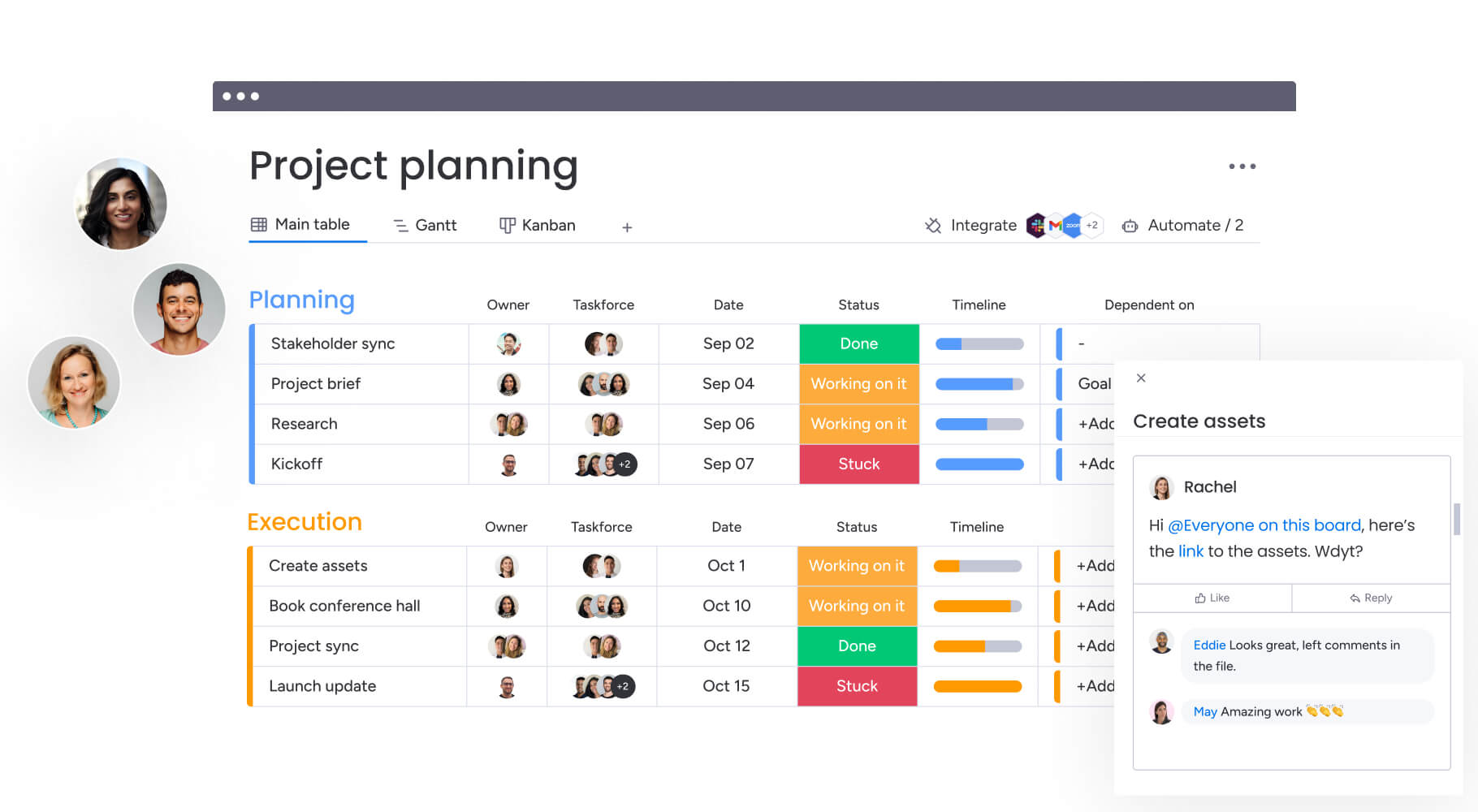
Scaling time batching across an entire team or department requires a platform that can visualize batch schedules, automate request routing, and measure whether batching is working. monday.com’s AI Work Platform gives you the infrastructure to enforce it at scale, measure its impact, and refine it over time.
Here’s how monday.com’s AI Work Platform’s dynamic features support and extend time batching.
Multiple board views (Timeline, Calendar, Gantt, Kanban)
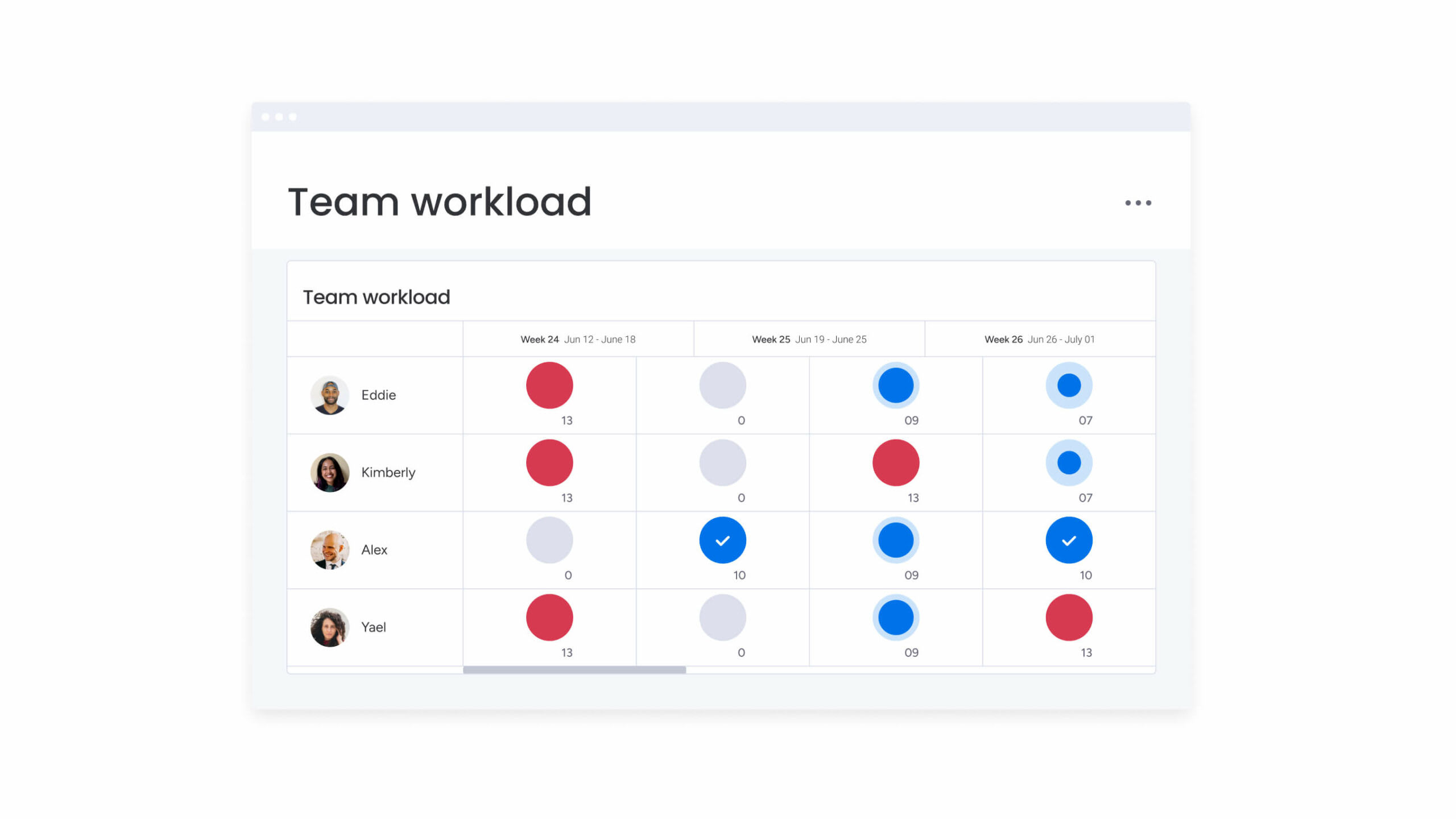
Visualize your batch schedule across the team using the view that fits your workflow. The Calendar view shows batched blocks as calendar events, making it easy to spot scheduling conflicts. The Timeline view maps batch windows across team members, and the Workload widget shows how batch assignments distribute across team capacity — so managers can identify who’s overbatched and who has room.
Automations
Route incoming requests automatically to batched queues instead of delivering them as real-time interruptions. For example, set an automation so that when a form is submitted, the request is added to a “Friday review batch” board. Automations can also send notifications when a batch block is about to start, or create templated boards for recurring batch types — eliminating the manual setup that makes batching feel like overhead.
Time tracking
Monitor actual time spent per batch and compare it to planned batch duration. Track which batch types consistently overrun their allocated windows. This data fuels your weekly batch reviews and turns subjective impressions (“I feel like my email takes too long”) into objective evidence you can act on.
Dashboards
Pull real-time reporting on batch completion rates, overdue items, and project velocity into a single view. Dashboards connect individual batching behavior to team-level outcomes — showing whether batched weeks produce faster delivery, fewer overdue items, and higher completion rates than fragmented ones.
monday sidekick and monday agents
monday sidekick acts as your AI-powered work assistant, helping you stay focused during batched work sessions by handling cognitive micro-tasks that would otherwise pull you out of flow. It can summarize long threads, generate first drafts, answer questions about project status, and flag relevant context — all without forcing you to switch from your current task to a research or coordination mode.
monday agents take automation further by executing entire workflows autonomously. They can monitor boards for specific conditions, route requests to the appropriate batch queues, update stakeholders, and handle repetitive processes end-to-end. Together, they protect your batched blocks by eliminating the small interruptions and manual handoffs that fragment focus, letting you stay in a single cognitive mode for the full duration of your scheduled batch.
Get startedMake time batching a team-wide habit
Time batching works for individuals, but it compounds when adopted across a team. When every member commits to shared deep work windows, synchronized communication batches, and protected focus time, the interruption load drops for everyone — not just the person who installed a focus timer app.
The shift isn’t about willpower. It’s about structure. Teams that embed time batching into their workflows, calendars, and platforms see measurable gains in project velocity, fewer overdue items, and lower end-of-day fatigue. What would your team accomplish if every member had two uninterrupted hours of deep work each day?
Create standard batch definitions so teams can coordinate easily. Companies might designate Administrative Blocks or No-Meeting Zones applying across all departments.
Start with a 1-week audit, batch your 2 highest-volume task types, and review the results. Then bring the system to your team using monday.com’s AI Work Platform to visualize, automate, and measure the impact.
Get startedFAQs
What is time batching?
Time batching is a productivity method where you group similar tasks into dedicated, recurring calendar blocks and complete them without interruption. Unlike time blocking, which simply reserves calendar space for any activity, time batching specifically requires grouping tasks by type — like handling all emails in one window or stacking all meetings onto one day.
What is the difference between time batching and time blocking?
Time batching is a subset of time blocking. Time blocking reserves any calendar slot for any purpose — a workout, a project, a lunch break. Time batching adds an additional constraint: the tasks within the block must be similar. For example, blocking 2:00 – 4:00 p.m. for "focus time" is time blocking. Blocking 2:00 – 4:00 p.m. specifically for "code reviews" is time batching.
How long should a time batch be?
It depends on the task type. Communications batches (email, Slack) work well at 30 – 60 minutes. Deep work and creative tasks need 90 minutes to 3 hours for flow states to develop. Administrative batches (expenses, scheduling) fit into 30 – 45 minute windows. Avoid exceeding 3 hours without a break — sustained focus has diminishing returns beyond that threshold.
What tasks are best suited for time batching?
The strongest candidates are tasks that repeat frequently and draw on the same type of thinking. Email and communications, meetings, deep and creative work (writing, analysis, design), administrative tasks, and reviews and approvals all batch effectively. Tasks requiring real-time response — live support, emergency escalations — should remain outside your batching system.
How do I know if time batching is working?
Track task completion rates, reduction in overdue items, and project delivery speed over 2 – 4 weeks. Subjective indicators matter too: less end-of-day mental fatigue, fewer unfinished tasks at week's end, and a stronger sense of control over your schedule. If completion rates aren't improving, review whether your batches are being interrupted or poorly timed.
How does the monday.com's AI Work Platform support time batching?
monday.com's AI Work Platform supports time batching through automations that route incoming requests to batched queues instead of delivering them as real-time interruptions. Calendar and Timeline views let teams visualize batch blocks across members, time tracking monitors actual vs. planned batch durations, and dashboards report on team-level completion metrics — turning time batching from an individual habit into a measurable team system.
Is time batching the same as the Pomodoro Technique?
Time batching and the Pomodoro Technique both structure how time is used, but they serve different purposes. Time batching groups similar types of work into longer, dedicated sessions to reduce context switching. The Pomodoro Technique focuses on short, timed intervals (typically 25 minutes) followed by breaks, regardless of task type. Many teams combine both approaches by batching similar work and using shorter intervals within those sessions.
What if my role requires constant availability?
Roles that require responsiveness can still apply time batching with some adjustments. Instead of long focus blocks, shorter batching windows of 20–30 minutes can help group communication or quick tasks more efficiently. Clear expectations around response times and simple escalation paths for urgent issues help maintain service levels without requiring constant interruptions throughout the day.
How do you handle urgent requests during batch time?
Urgent requests can be managed by clearly defining what qualifies as time-sensitive and establishing a simple escalation process. True emergencies can interrupt a batch when necessary, while non-urgent requests are handled during designated communication blocks. This balance protects focus without compromising responsiveness where it genuinely matters.
Can creative work be effectively batched?
Creative work often benefits significantly from batching because it requires uninterrupted thinking time. Grouping similar creative activities together allows ideas to develop more naturally and reduces the disruption caused by switching between unrelated tasks. Longer, protected sessions give writers, designers, and strategists the space needed to produce higher-quality work with less friction.
 Get started